Send multi-option quotes that customers sign and pay online
Create stunning proposals that convert, with a live profit forecast so you know your margin before you send. Multi-option quotes, e-signatures, and instant payment collection in one seamless flow.
“My favorite features are how quickly we can build a quote. Templates look good with optional extras.”
Winning more work starts with better proposals. Payaca's quoting tools are designed specifically for clean tech installers who need to present complex system options clearly.
Design the roof in Payaca with Glow, or import from OpenSolar. Build multi-option proposals that customers can customise, and collect deposits the moment they accept.
Every proposal is tracked in your pipeline so you always know where each opportunity stands, from first enquiry to signed contract.
What's included
Everything you need to send multi-option quotes that customers sign and pay online.
Interactive proposals
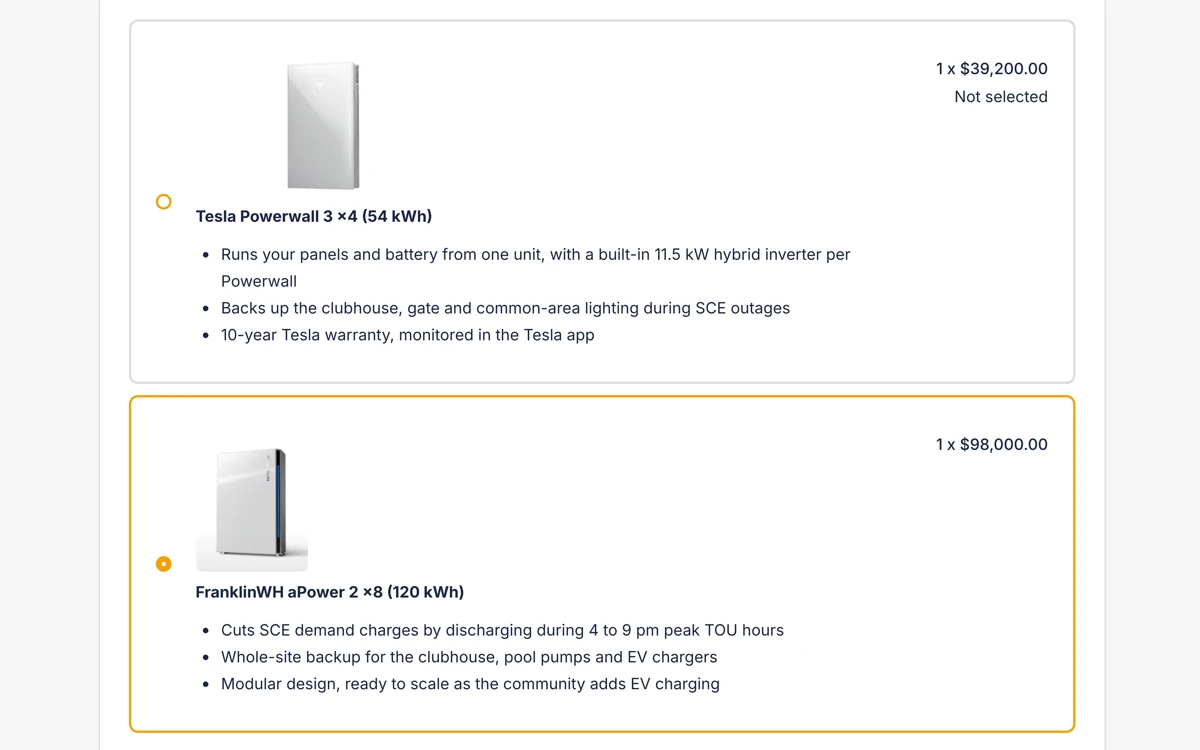
Create multi-option quotes customers can customize. They pick packages, add extras, and see totals update in real-time.
E-signatures
Customers sign digitally from any device. No printing, scanning, or chasing paper. Legally binding and audit-ready.
Design in Payaca, or import
Design the roof in Payaca with Glow, in limited release, or import from OpenSolar. Either way the kit lands on the quote without re-entry.
Payment collection
Collect deposits at acceptance via Stripe. Card payments, bank transfers, or payment plans. The customer chooses.
Grants on proposals
Add grants and rebates in the builder. The customer sees each grant as a named deduction and the total payable after funding. Available where grants are enabled on your account.
Frequently asked questions
- What is solar quoting software?
- Solar quoting software lets installers create professional proposals with system specifications, pricing options, and e-signatures. In Payaca you design the roof with Glow, or import from OpenSolar, and the kit becomes a multi-option quote customers can customise and accept online.
- How do I create multi-option solar proposals?
- In Payaca, you build a proposal with multiple packages, for example, a 4kW system, a 6kW system, and a premium option with battery storage. Customers see all options side by side, select extras, and see totals update in real-time before signing digitally.
- Can customers pay a deposit when they accept a quote?
- Yes. Payaca collects deposits automatically at the point of acceptance via Stripe. Customers choose card payment, bank transfer, or a payment plan, reducing the time between acceptance and getting paid.
- Does Payaca integrate with solar design tools?
- Yes, and you can also design in Payaca. Glow, in limited release, designs the roof from your own catalogue on the project itself. The OpenSolar integration is unchanged, so system designs, equipment specifications and pricing flow into your proposals without re-entry.
- How does e-signature work for installation quotes?
- Customers receive a link to view their proposal, select options, and sign digitally from any device. Signatures are legally binding and stored against the project for audit purposes.
- What does my customer see when they accept a proposal?
- Terms of business get their own confirmation step, and accepting opens a clear dialog with Confirm and Cancel always visible, so a quote worth thousands is never agreed on a single accidental click. If acceptance leads to a deposit invoice or finance provider, the customer sees a named interstitial explaining what's happening next instead of the page appearing to hang mid-redirect.
Ready to run your whole install business in one system?
Growing installers run their whole job on Payaca, from quote to final payment. We'll handle your workflow mapping and data migration.