Track deals, customers and emails from lead to install
Built for installers switching off Salesforce or HubSpot. All the pipeline management, customer records and email tracking you'd expect, plus the design tool imports, compliance and field service a generic CRM can't do.
If you're searching for a CRM, you already know your spreadsheets aren't cutting it. But most CRMs weren't built for installation businesses. You end up bolting on field service tools, compliance systems, and quoting software until nothing talks to anything else.
Payaca gives you everything you'd expect from a CRM (pipeline management, customer records, email tracking, activity timelines, tags, custom fields, automations, tasks, and reporting) plus everything a generic CRM can't do. Solar design with Glow, interactive proposals with design tool imports, map-based scheduling, compliance documentation, a field service mobile app, and integrated invoicing.
Agent Dave, the AI built into Payaca, answers questions from your account data and makes the changes you describe, inside your permissions. No filters to configure, no reports to build. Just ask.
One system. No duct tape.
Every customer on one record
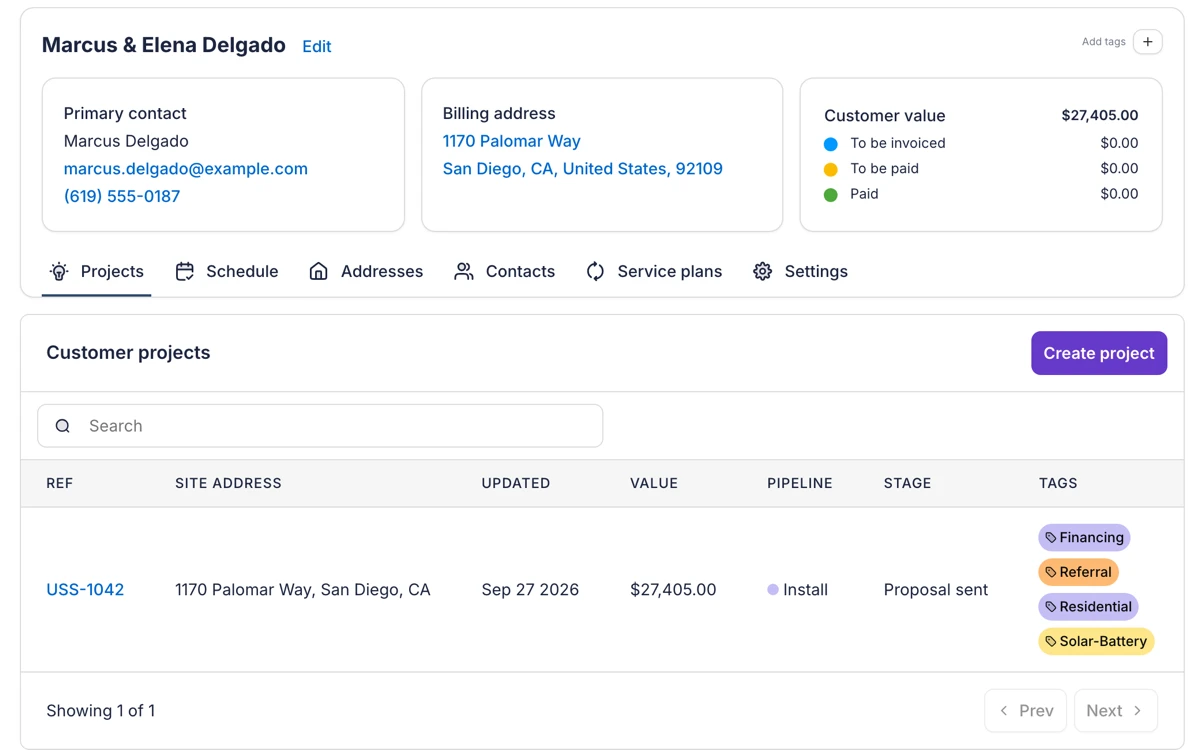
Each customer record shows the primary contact, the billing address and what the customer is worth, split into what's still to be invoiced, what's waiting to be paid and what's been paid. Their projects sit underneath, each with its pipeline, stage, tags and owner.
A timeline of who did what
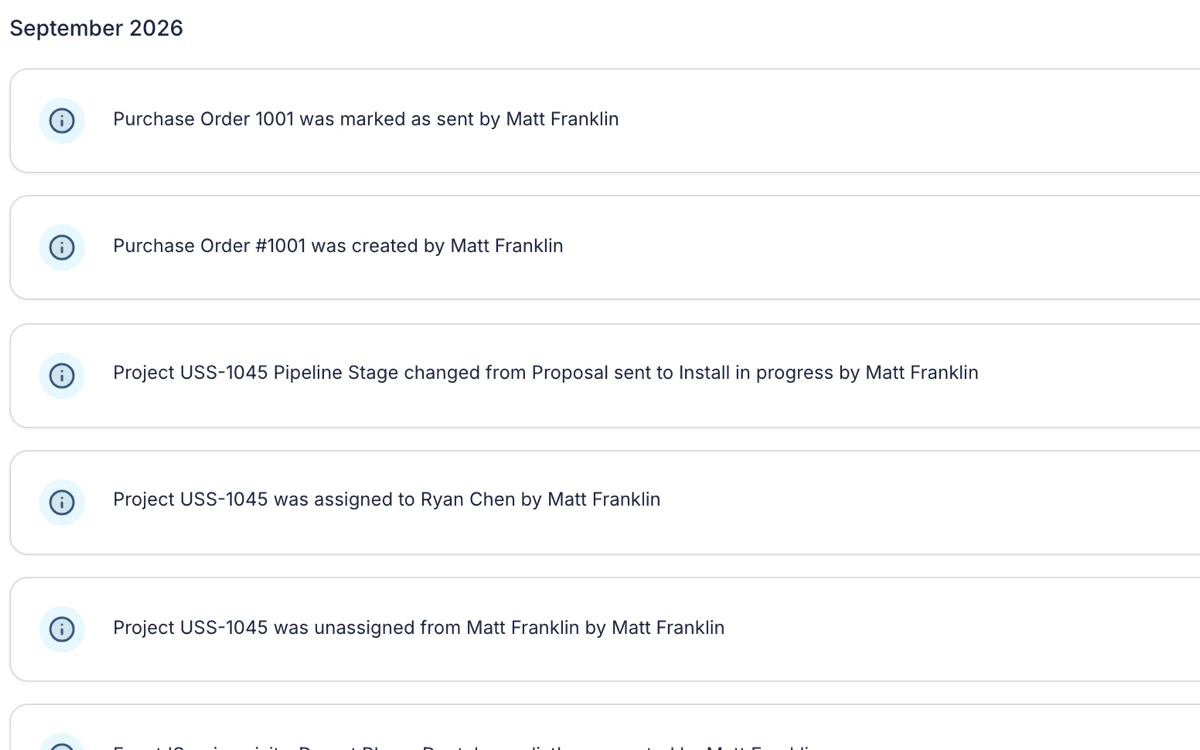
Every project keeps an activity timeline of who changed what and when. Purchase orders raised and sent, stage changes, new tasks and changes of owner are all recorded against the project, so anyone can see what happened without asking around.
What's included
Everything you need to track deals, customers and emails from lead to install.
Pipeline management
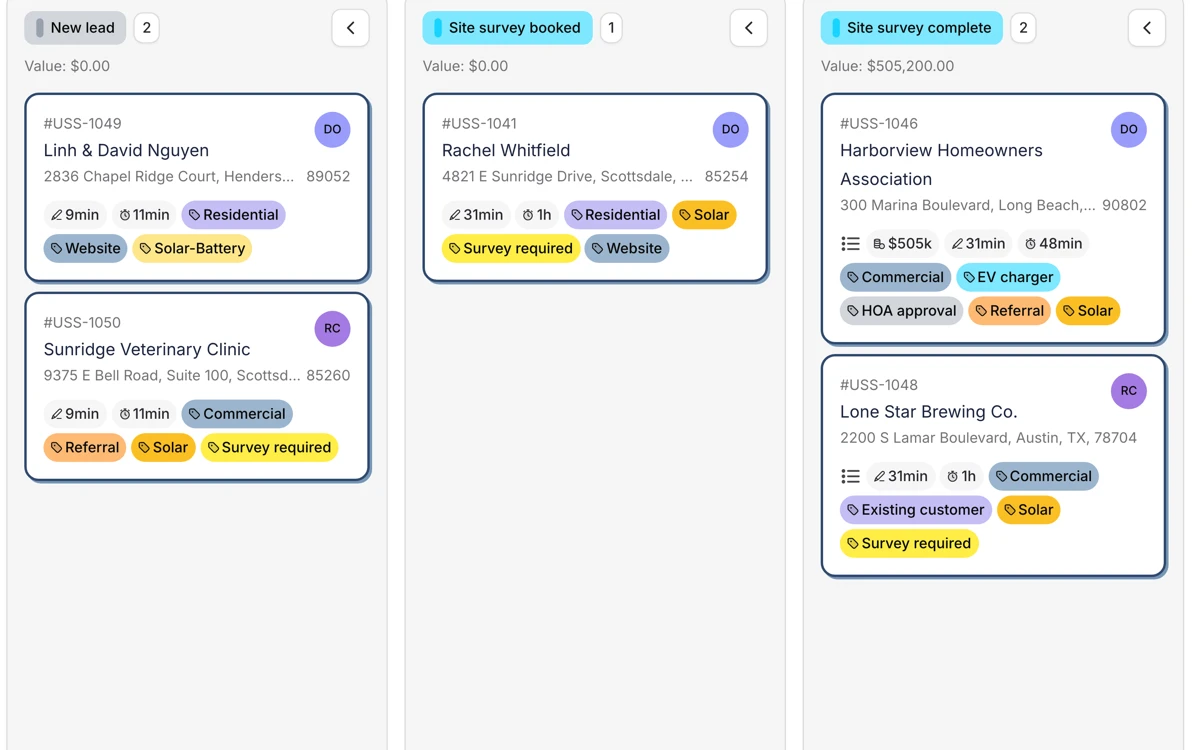
Visual pipeline stages from first enquiry to completed installation. See values at each stage, set automations per stage, and track conversion rates across your team.
Email inbox
Track every customer email against the right project. Forward inbound emails or BCC outbound ones. Search finds emails by anyone on them, whether sender, recipient, CC, or whoever originally sent a forwarded thread. Your whole team sees the full conversation history in the project timeline.
Customer records
Complete customer profiles with tags, custom fields, financial totals, project history, and communication logs. Add notes with @mentions to keep your team aligned.
Agent Dave
The AI built into Payaca. Ask Dave where jobs are stalling, which invoices are unpaid, or to build the automation that fixes it. He works inside your permissions and asks before he changes anything.
Switching from a generic CRM?
See pipeline, email tracking, customer records, and Agent Dave on a real clean tech project in 20 minutes.
Frequently asked questions
- Is Payaca a CRM?
- Payaca includes full CRM functionality (pipeline management, customer records, email tracking, tags, custom fields, and activity timelines) but goes far beyond a traditional CRM. It also handles quoting, scheduling, field service, compliance, invoicing, and more, all purpose-built for clean tech installers.
- Can Payaca replace Salesforce or HubSpot?
- Yes. Many installers switch from generic CRMs like Salesforce and HubSpot because those tools weren't built for installation businesses. Payaca gives you the pipeline and contact management you need, plus industry-specific features like design tool imports, compliance automation, and field service management.
- How does email tracking work in Payaca?
- Payaca gives each user a unique forward address and BCC address. Forward inbound customer emails to log them automatically against the matching project, or BCC outbound emails to track what you've sent. Emails appear in the project timeline for your whole team to see.
- Can each team member send proposals and invoices from their own email address?
- Yes. When sending a proposal, estimate, invoice or appointment confirmation, users pick which verified address it sends from, including their own login address if it sits on a verified domain. The choice is personal per user and remembered next time, so customers hear from the person they actually dealt with instead of a generic company inbox.
- Can I manage my sales pipeline in Payaca?
- Yes. Payaca has visual, customisable pipeline stages that track every project from initial enquiry through to completion. Set automations per stage, see values at each stage, drag and drop to move projects, and get reporting on conversion rates and pipeline health.
- What makes Payaca different from a generic CRM?
- Generic CRMs handle contacts and deals. Payaca handles the entire installation lifecycle. That means solar design with Glow and design tool imports, quoting, scheduling with map-based views, compliance documentation, field service via a mobile app, invoicing, and customer portals. One system instead of a CRM plus five other tools.
- What is the best CRM for solar installers?
- The best CRM for solar installers is one built for the installation lifecycle, not just sales. Solar businesses need design tool imports, multi-option proposals, compliance workflows, field service, and payment collection alongside pipeline management. Payaca is a renewable energy CRM that covers all of this in one system, so you do not need to bolt together a generic CRM with separate field service and compliance tools.
- Can I automate follow-ups and reminders?
- Yes. Payaca has automation triggers across projects, proposals, invoices, events and documents. Automate email and SMS follow-ups, move projects between pipeline stages, create tasks, and apply tags when those triggers fire.
- What is Agent Dave?
- Agent Dave is the AI built into Payaca. Ask a question in plain English, such as which invoices are unpaid or what jobs Sarah has tomorrow, and he answers from your account data. Ask him to build an automation or edit a template and he says what he is about to do, then does it once you confirm. He works inside your existing permissions.
Ready to run your whole install business in one system?
Growing installers run their whole job on Payaca, from quote to final payment. We'll handle your workflow mapping and data migration.