Try the new Proposal builder

We have rebuilt the Proposal builder from the ground up, and you can start using it today.
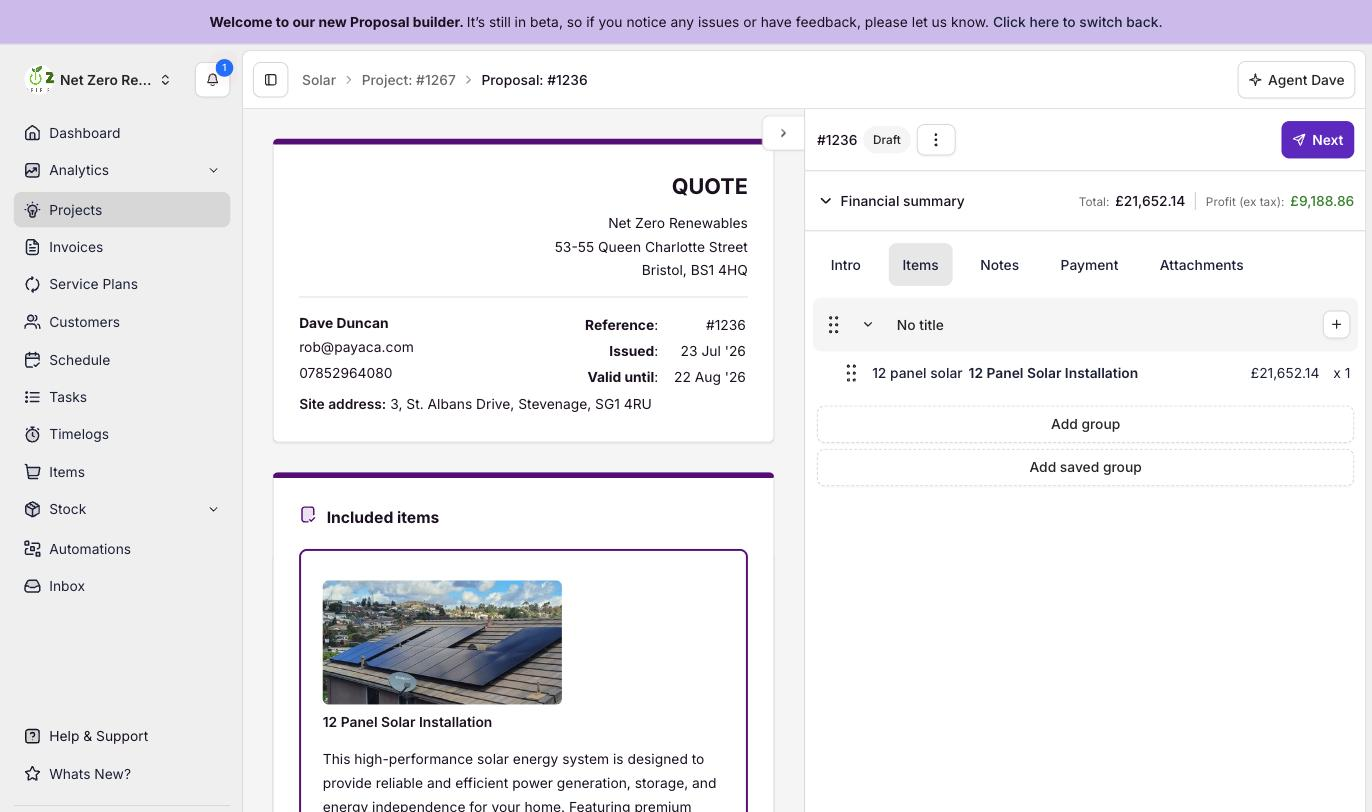
Open a Proposal and choose Try the new Proposal builder. You will land in the new editor, where:
- The live preview sits beside your work, so you see the Proposal as your Customer will while you build it.
- Line items edit inline, so you add, edit and price them without leaving the page.
- Saved groups drop a ready-made set of Items in with a single click.
- Payment schedules, deposits and payment options live right in the builder, alongside a financial summary with deposit detail and a Proposal-level discount.
- The everyday details are built in too: a valid-for period, an editable reference, and a default tax rate on new Items.
When the Proposal is ready, apply a Template and send or resend it to your Customer, all from the same screen (and download a PDF too, if you need one).
Prefer the builder you know? Your choice is remembered, and you can switch back any time from the menu in the builder header. Proposals you have already sent continue to open and behave exactly as before.
This is just the start
This first release is the new builder for your team inside the Payaca web app, and it is the foundation for a much bigger piece of work. We are building the rebuilt experience through to the Customer's side next: a new Proposal page in the Client Portal where they can choose options, accept and sign, together with new Proposal Templates and richer ways to group and present what you are quoting.
It is an early release and we are refining it actively, so we would love your feedback. Turn it on, put a few Proposals together, and tell us what you think.