Filter and sort the Invoices list by how overdue they are

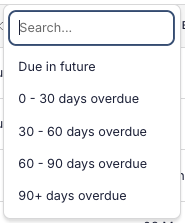
Chasing payments is easier when you can quickly find what's overdue and by how long. The Invoices list now has a Due filter that groups invoices by their due date: due in future, or overdue by 0–30, 30–60, 60–90, or 90+ days. Pick several buckets to combine them.
You can also sort the list by Total, Due or Created date, click a column heading and choose ascending or descending. Invoices on archived Projects now show in the list by default, marked with a warning icon next to the project reference so you can tell them apart.