Stock & Purchasing

Order the kit, hold the stock and know what every job really cost

Link materials to the items you sell so the margin is known when you quote. Raise purchase orders to suppliers from the project, hold bulk stock in named locations at weighted average cost, and see forecast against actual cost on every job.

A branded purchase order raised in Payaca, with the supplier, delivery address and line items

Materials in Payaca are what you pay for. The items on your proposals are what you charge. Keeping the two apart, and linking them, is what lets every job show its margin from the day it is quoted.

The same materials drive the purchase orders you send to suppliers and the stock you hold between jobs, so the cost on the project is the cost you actually paid.

Materials linked to the items you sell

Your materials are internal and only your team sees them. Each one has at least one supplier with a price before tax, and a preferred supplier where you buy it regularly. Import a supplier's price book from a CSV file instead of typing it in line by line.

Link a material to an item you sell and the item knows its cost. Add that item to a proposal or an estimate and Payaca works out which materials the job needs and what they cost you. On an estimate you can price a line as a markup on its materials, and the price follows the cost when a supplier's price changes.

The materials list on the project

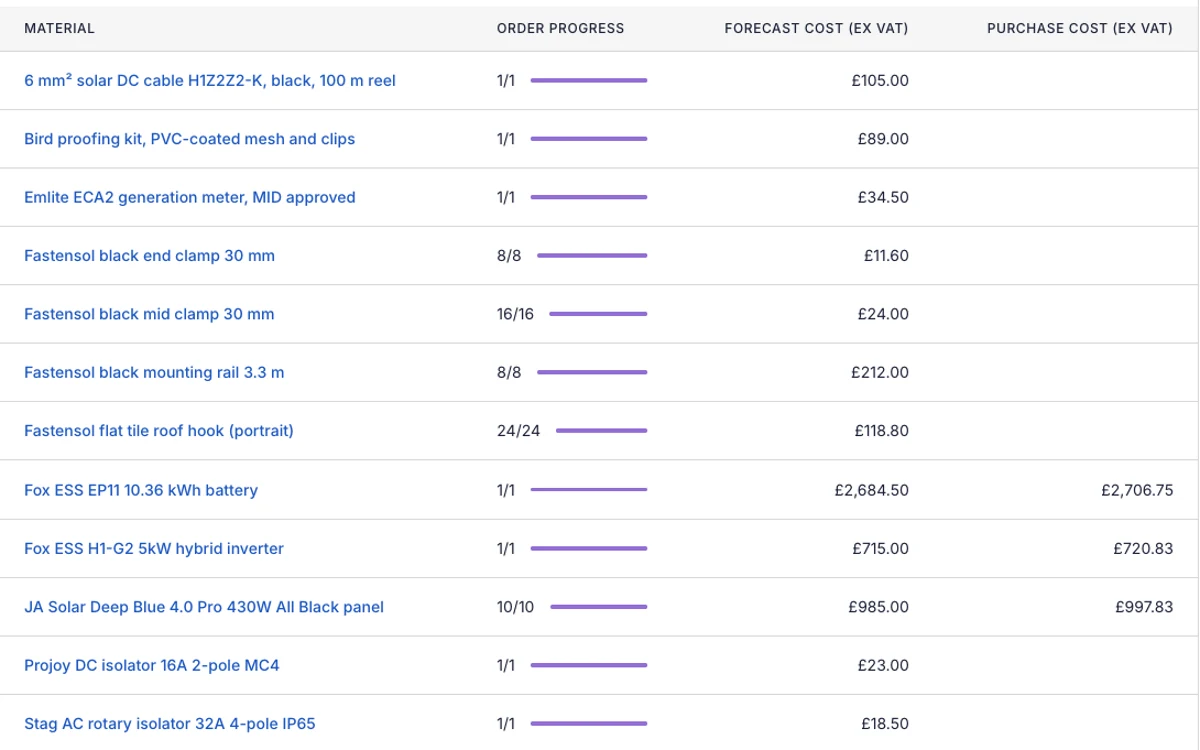
Every project has a Materials tab. The summary lists every material the job needs with a bar showing how much has been ordered against how much is required, and the value purchased so far. Separate views show what is still to order, what is on order, the purchase orders themselves and a history of every change.

Your field team can request materials from site in the mobile app. The request lands on the project's list of materials to order, and the people it names are notified.

A project's materials list in Payaca, with order progress and forecast cost against purchase cost

Purchase orders to your suppliers

Click Order on the project and choose a supplier. Payaca groups the job's materials by supplier, so a job that needs kit from three suppliers gets three purchase orders, each filled in with that supplier's prices. Send each one from Payaca with the purchase order PDF attached, and copy yourself in if you want a record in your own inbox.

When the delivery arrives, confirm the purchase order with the quantity received and the price you were actually charged. Part deliveries are fine. The materials move from ordered to purchased, and the purchase order shows its forecast cost next to its purchase cost, so a supplier price rise shows up on the order and not months later in the accounts.

Order from City Plumbing without leaving the job

Connect your City Plumbing account and its catalogue and prices sit inside Payaca. Raise the order from the job's materials list and it goes straight to City Plumbing, for delivery or for collection from the branch you choose, with no second portal and nothing typed in twice.

Updates come back onto the purchase order in near real time as the branch works through it: acknowledged, ready for collection or delivery, then collected or delivered. If the branch has to cancel, you see the reason, so nobody has to ring the counter to find out where the order is.

Stock held in named locations

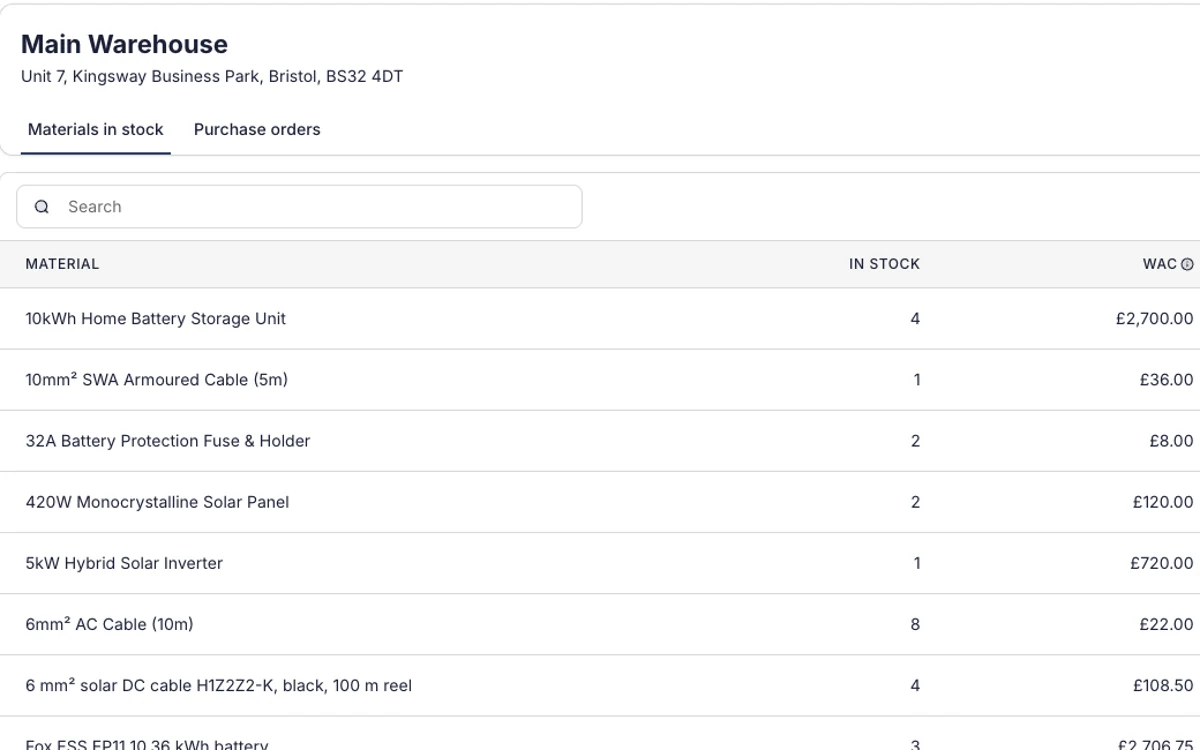
Bulk buys stop landing on whichever job happened to trigger the order. Set up a stock location for each warehouse, unit or van, raise purchase orders against the location and confirm them when the stock arrives. Each location lists what is in stock, the weighted average cost of one unit and the total value on hand.

When a job needs something you already hold, choose the location in the Order picker instead of a supplier. Payaca selects every material the project needs that the location holds, up to the quantity on hand, and moves it onto the job.

A Payaca stock location, Main Warehouse, listing materials in stock at weighted average cost with a total value of 拢26,419

Deliveries at different prices

Prices move between deliveries, and weighted average cost handles that for you. Each delivery blends into the cost of what you already hold. Hold ten units bought at 5.00, receive five more at 6.00, and every one of the fifteen now costs 5.33.

When that stock moves onto a project, the job is charged at the average, not at the price of the latest order. The margin on each job reflects what the material actually cost the business.

The real cost on the project

Stock moved onto a job is costed at the location's weighted average cost. Materials bought for the job are costed at the price you confirmed on the purchase order. The project's forecast against actual view puts materials alongside revenue and profit, so you can see whether a job is still making the margin you quoted while the work is live.

Supplier invoices read for you

Not everything goes through a purchase order. For the part picked up at the counter or the fittings bought on the way to site, upload a photo, screenshot or PDF of the supplier invoice on the job's Materials tab and Payaca reads the lines with AI in a few seconds.

It works out the price of one unit when the invoice prices by the pack, reads whether line prices include tax from the invoice's own totals, and keeps quantities billed by length or weight exactly as printed. A PDF holding several invoices is read in full, and statements and remittance slips are skipped. You check each line, drop anything you don't need and import, and the cost lands on that project.

The books match what you ordered

With Xero connected, purchase orders sync to Xero alongside your customer invoices and customers, so what you ordered is in the books without being typed in again.

QuickBooks syncs customer invoices and customers. Purchase orders stay in Payaca, where each one carries its forecast and purchase cost.

What's included

From the item on the quote to the stock on the shelf.

Materials linked to what you sell

Link each material to the item it goes into. Add that item to a quote and Payaca knows which materials the job needs and what they cost you, so the margin is there before you send it.

The materials list on every project

Every project has a Materials tab showing what the job needs, what is still to order, what is on order and what has arrived, with an ordered against required bar on every line.

Purchase orders from the project

Payaca groups the job's materials by supplier and drafts one purchase order for each, at that supplier's prices. Send it from Payaca with the PDF attached and confirm it when the delivery arrives.

Stock in named locations

Set up the warehouses, units and vans you hold stock in. Each one shows what is in stock, what a single unit cost and what the stock on hand is worth.

Weighted average cost

Each delivery blends into the cost of what you already hold, so a batch bought at a different price moves the average instead of replacing it. Stock moved onto a job is charged at that average.

Forecast against actual

Every purchase order shows the forecast cost from your supplier prices next to the purchase cost you confirmed, and the project puts materials next to revenue and profit while the work is live.

Order from City Plumbing

Connect your City Plumbing account to order from their catalogue inside Payaca, for delivery or collection from a branch, and follow the order on the purchase order.

Supplier invoices read for you

Upload a photo or PDF of a supplier invoice on the job. Payaca reads the lines, prices and tax with AI, and you check them before they import.

Xero and QuickBooks

Purchase orders sync to Xero. Customer invoices and customers sync to Xero or QuickBooks.

Frequently asked questions

What is the difference between materials and items?
Materials are what you buy and what they cost you, and only your team sees them. Items are what you sell and what you charge, and they appear on proposals and invoices. Link a material to an item and every quote that uses the item knows its cost.
Can one material have more than one supplier?
Yes. Link every supplier you buy it from, each with its own price, and mark one as preferred. When you order from a project, Payaca uses your preferred supplier or the cheapest one.
How does weighted average cost work?
Each delivery into a stock location blends into the cost of what is already there. Hold ten units bought at 5.00 and receive five more at 6.00, and all fifteen are valued at 5.33 each. That average is what a project is charged when the stock moves onto it.
Can I move stock onto a project instead of buying it again?
Yes. On the project's Materials tab, click Order and choose a stock location instead of a supplier. Payaca selects the materials the project needs that the location holds, up to the quantity on hand, and moves them onto the job at the location's weighted average cost.
Can the field team ask for materials from site?
Yes. In the mobile app, a field user opens the scheduled event, taps Request Materials, picks the materials and quantities and submits. They land on the project's list of materials to order, and the people named are notified.
Do purchase orders sync to Xero or QuickBooks?
Purchase orders sync to Xero when it is connected, along with customer invoices and customers. QuickBooks syncs customer invoices and customers but not purchase orders, so with QuickBooks your purchase orders stay in Payaca.
Can Agent Dave raise purchase orders?
No. Agent Dave, the AI built into Payaca, can adjust stock when you ask him, but purchase orders are raised and sent by your team.
Who can see stock locations?
Admins and super admins, by default. You can change which roles work with stock in permissions and roles.
Can I order from City Plumbing in Payaca?
Yes, in the UK. Connect your City Plumbing account in Connections and you can order from their catalogue on a job, for delivery or branch collection. The purchase order then shows when the branch acknowledges it, when it is ready, and when it is collected or delivered, or the reason if it is cancelled, in near real time.
Can Payaca read a supplier invoice?
Yes. On a project's Materials tab, upload a photo, screenshot or PDF of the invoice and Payaca reads the line items, prices and tax. You review each line before importing, and the cost is recorded against that project.
Dedicated onboarding available

Ready to run more installs without losing control?

Growing installers run their whole job on Payaca, from design or enquiry to payment. We'll handle your workflow mapping and data migration.

Dedicated onboarding
Data migration support
AI + human support