See your Payaca schedule in your own calendar

You can now subscribe to your Payaca schedule from Google Calendar, Apple Calendar or Outlook, and see the Scheduled Events assigned to you alongside the rest of your day.
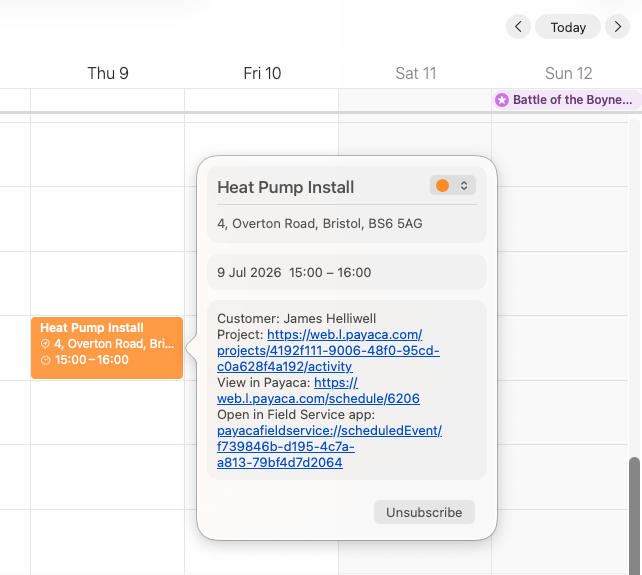
Each Scheduled Event carries its time, location, and Customer, plus links straight back to the job in the Payaca web app and the Field Service app - so it is one tap from your calendar to the full details.
Turning it on
Head to Personal Settings → Calendar in the Payaca web app and generate your link. Then either:
- Subscribe in one tap with the calendar button, which hands the feed to your default calendar app, or
- Copy the link and paste it into Google Calendar, Outlook, or wherever you keep your day.
The feed is read-only - a mirror of your Payaca schedule, not a place to edit it. When an Event is rescheduled or cancelled in Payaca, your calendar catches up on its next refresh. Bear in mind that calendar apps poll subscriptions on their own schedule, so a change can take a while to show - Apple Calendar is quickest, while Google and Outlook can take several hours.
Keeping it private
Your link is personal and secret - anyone who has it can see your schedule, so treat it like a password. If it ever leaks, or you simply want to switch it off, you can regenerate or remove it from the same page. Regenerating immediately stops the old link from working.