Choose who your email is sent as

The From line on a send form is now a picker. Choose the address the email goes out from, and that is the name and address your Customer sees.
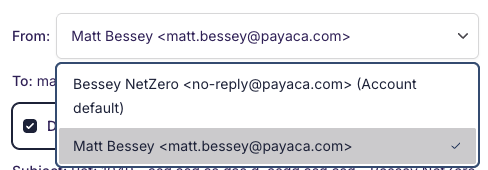
Which addresses you can pick
- Your own address, when it sits on a domain your business has verified.
- Your business's sending addresses, every one added under Outbound Emails that is confirmed or sits on a verified domain.
Where only one address is available to you there is nothing to choose, so the From line stays as plain text naming the sender the email goes out as.
Where you can choose
Proposals, Estimates, Change Proposals, Invoices, appointment confirmations and file shares all carry the picker. Resending a Proposal or an Estimate uses the same form, so the choice is there too, and resending a Change Proposal or an Invoice goes out from whichever address you picked last.
Automation emails, payment receipts, the deposit Invoice raised automatically on acceptance, and anything Payaca sends on a schedule go out from your Account default. Payaca remembers your last choice and uses it on your next send everywhere the picker appears.
Replies reach you
A Customer replying to any email Payaca sends on your behalf now lands in a mailbox you read. Where the email went out from an address your business owns, the reply goes back to that address. Otherwise it goes to your Account's contact address.
An appointment confirmation or reminder going to several Customer contacts also sends each contact their own email, so nobody sees anyone else's address.
Add addresses and verify a domain on your Email settings page.