Tailor Agent Dave to your business

Agent Dave, the AI assistant inside Payaca, can now follow standing instructions you set for your whole account.
If you are a Super Admin, open Company Settings and go to the new Agent Dave tab. Type your guidance (in Markdown) into Instructions for Dave and save. From then on, Dave includes those instructions in every conversation across your account, so it responds the way your team actually works.
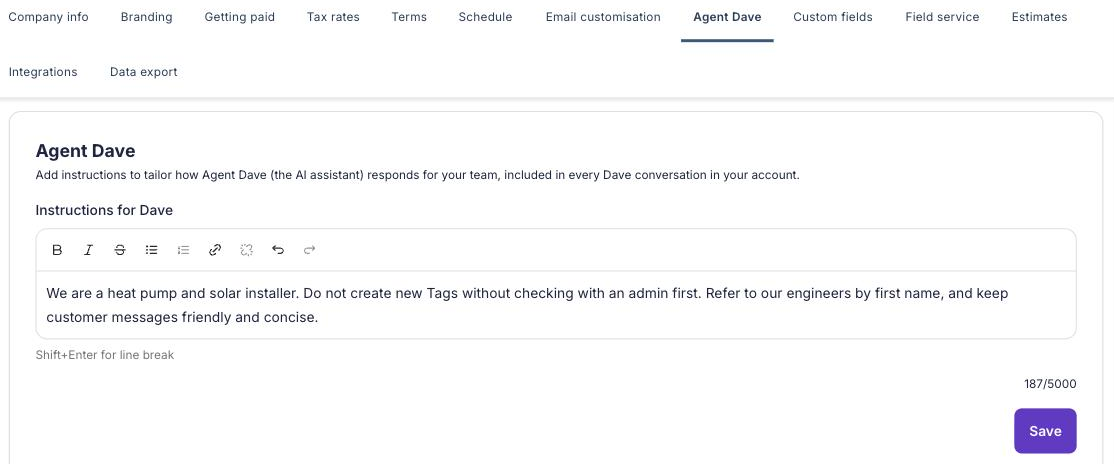
Use it to teach Dave what is specific to you, for example:
- How you work. "We are a heat pump installer exclusively."
- Your house rules. "Do not create new Tags without asking first."
- Your language and priorities. What you call things, the tone you want, and what matters most.
A few things worth knowing:
- The instructions apply to everyone in your account, and only Super Admins can see or edit them. The Agent Dave tab is hidden for everyone else.
- They shape how Dave responds, but they cannot override Dave's core rules, and they never give Dave access to anything outside your account.
- There is a length limit with a live counter, so you can see how much space you have used as you write.