Nested Fieldsets for structured site surveys and job data

Custom Fieldsets now support nesting - you can place a Fieldset inside another Fieldset, giving you an extra level of structure for organising your job data.
What's changed?
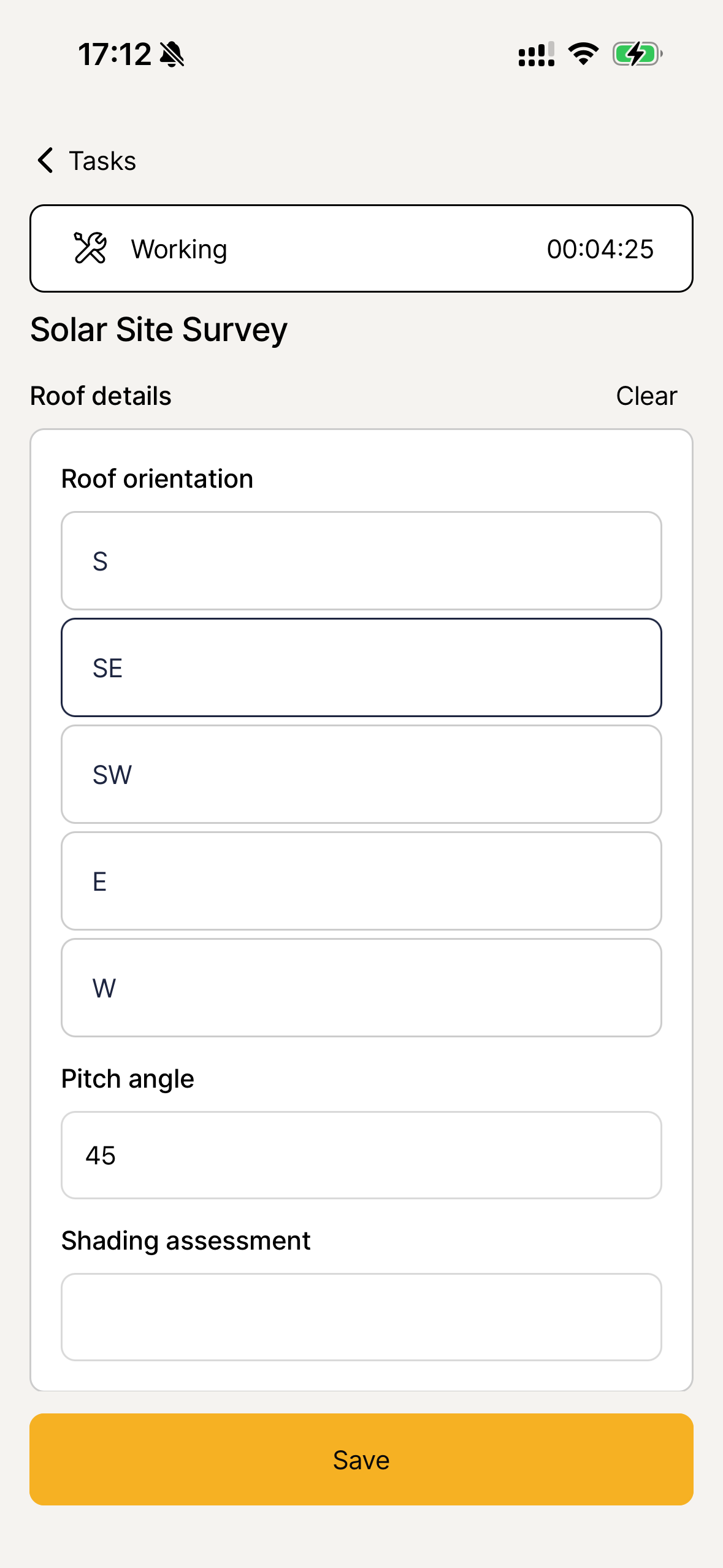
Previously, Fieldsets could only contain individual fields like text, number, or select. Now, you can add a sub-Fieldset inside a Fieldset, so related fields are grouped together.
For example, a "Solar Site Survey" Fieldset could contain a "Roof Details" sub-Fieldset with fields for roof orientation, pitch angle, and shading assessment, plus a "Heat Pump Siting" sub-Fieldset for proposed location, distance from boundary, and noise assessment.
This works across both the web app and the field app - your engineers can fill in nested Fieldset data on site, with full offline support.
How it works
- In Company Settings, when editing a Fieldset, you'll see "Fieldset" as an available field type you can add
- Nesting supports one level deep - a Fieldset can contain sub-Fieldsets, but those sub-Fieldsets can only contain individual fields
Why this matters
Multi-tech installs generate a lot of structured data - roof surveys, heat pump siting, DNO applications, EPC details. Without grouping, your Fieldsets become long flat lists that are hard to navigate on a phone. Nested Fieldsets keep related information together, so your team can find and complete the right fields faster, whether they're in the office or on site.