Plan and check solar wiring in Glow

Plan the electrical connections before installation. Glow now helps you connect panel strings to inverters and check the design. The electrical design stays on the project alongside the quote.
This builds on the solar design tool we launched in September.
Wiring checked before anyone is on the roof
Auto-string groups the panels into strings, connects them to your inverters and labels each string on the roof. Where the equipment ratings are known, Glow checks voltage and current against the inverter's limits, and re-checks every time you change a connection by hand.
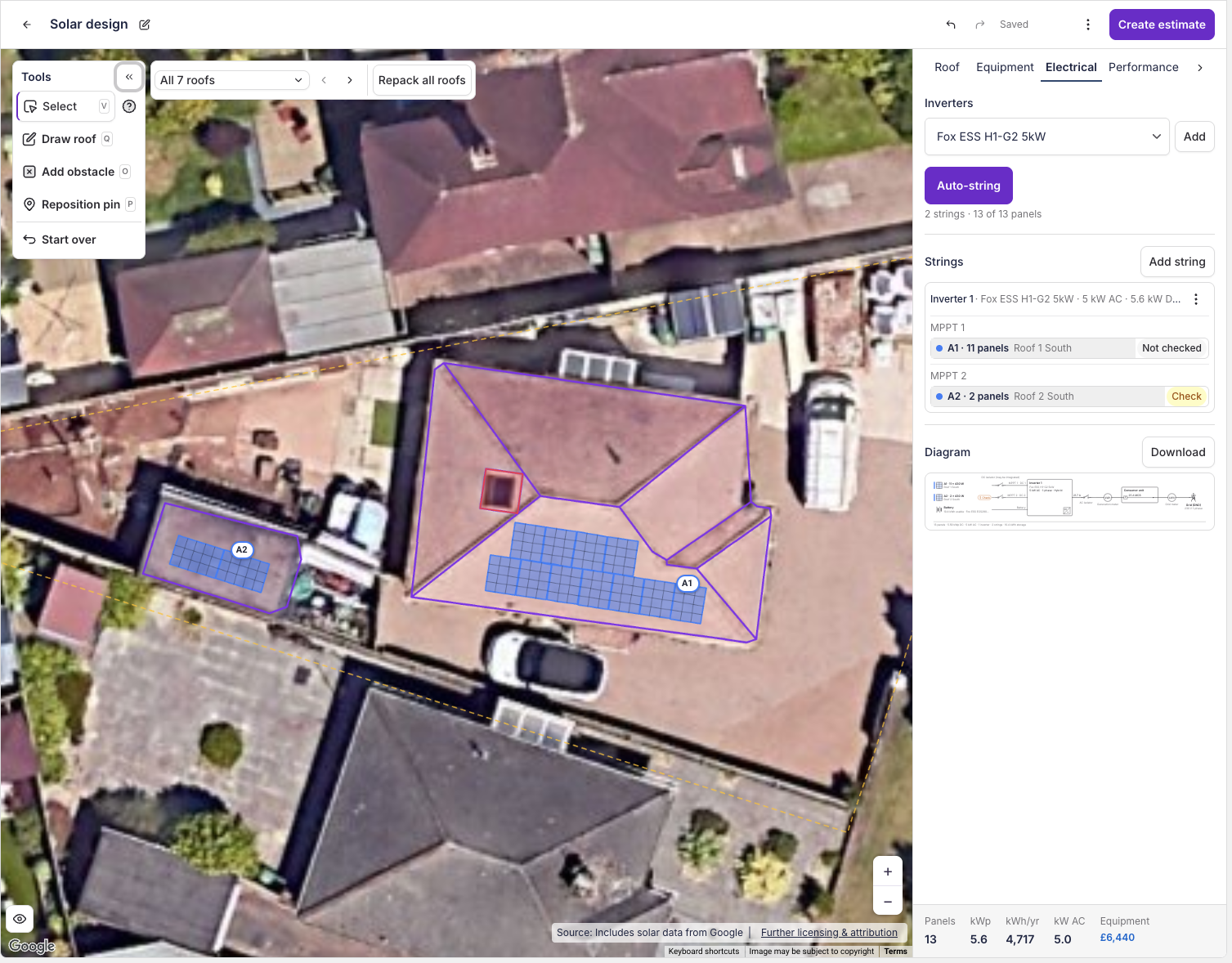
A single-line diagram your team can review
The same task draws the single-line diagram from the strings through to the grid. Your team can review the planned connections before installation.

Batteries priced straight into the quote
Pick how many batteries the customer needs and Glow adds the usable capacity and cost to the estimate and customer document.
More control over panel layouts
Swap the panel product or add an obstacle and your panels stay in place. Use Repack for a new layout or Undo to step back through edits. Set spacing and setbacks in the array rules.
On plans with Agent Dave, you can also ask him to choose equipment, set battery quantities, connect panel strings and create a draft estimate. Review the design in Glow as you go.
Glow is in limited release for UK solar businesses. Message our team in Payaca if you'd like early access for your account.